

Strapi Narration

Turn any Strapi entry into spoken audio. Pick a voice, generate an MP3 from the fields you choose, and store the result on the entry.

A free Strapi 5 plugin that adds a narration field to any content type, generates audio from your chosen fields via the ElevenLabs API, and saves the MP3 to your Media Library.

Highlights

What the plugin gives you out of the box.

  • Document and narration field icon

    One narration field

    One field on the entry holds the voice and the generated MP3.

  • Configuration and settings icon

    Configure per content type

    Pick the source fields and default voice from Content-Type Builder.

  • ElevenLabs built in

    Editors generate audio from the admin, with a dry-run mode for testing.

Overview

Strapi Narration adds one Narration custom field to your content types. Editors choose a voice, run Generate narration, and the plugin builds an MP3 from the fields you configured (using ElevenLabs for voice synthesis today), uploads it to the Media Library, and links it on the entry, so audio stays next to the content it was generated from.

Content Manager with generated audio

Below is a real Content Manager entry after narration has been generated. The field shows the voice in use, playback for the linked MP3, and actions to generate again or disconnect the file. Everything editors need without touching the Media Library or API.
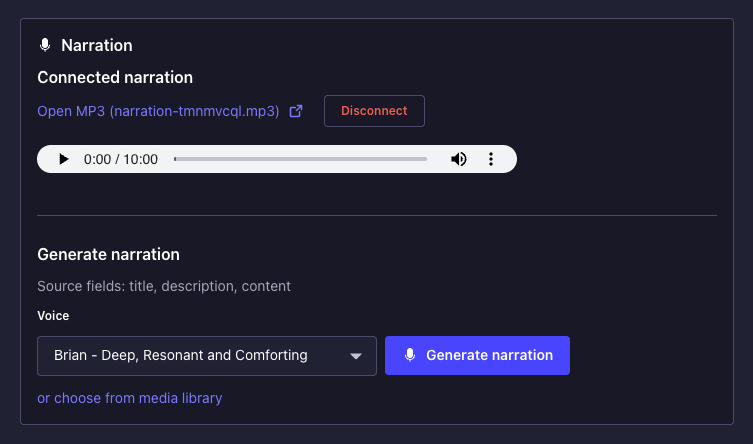

Strapi 5 Content Manager: Narration custom field on an entry with voice selector, Generate narration, and audio playback after MP3 is linked

Want help with Strapi or integrations like this?

We build the connections between CMS, AI, and the rest of your stack. Plugins like this one come out of that work.